%20-%20http%3A%2F%2Fwww.bohemiancoding.com%2Fsketch%20--%3E%3Ctitle%3EF21EF66B-AC70-4761-BD58-0CF80940AF0E%3C%2Ftitle%3E%3Cdesc%3ECreated%20with%20sketchtool.%3C%2Fdesc%3E%3Cdefs%3E%3ClinearGradient%20x1%3D%220.00537998663%25%22%20y1%3D%2249.9970053%25%22%20x2%3D%22100.036289%25%22%20y2%3D%2249.9970053%25%22%20id%3D%22linearGradient-1%22%3E%3Cstop%20stop-color%3D%22%23FF3176%22%20offset%3D%220%25%22%3E%3C%2Fstop%3E%3Cstop%20stop-color%3D%22%23FF7369%22%20offset%3D%22100%25%22%3E%3C%2Fstop%3E%3C%2FlinearGradient%3E%3ClinearGradient%20x1%3D%2248.5798817%25%22%20y1%3D%2254.2967493%25%22%20x2%3D%2255.1676529%25%22%20y2%3D%2234.4061796%25%22%20id%3D%22linearGradient-2%22%3E%3Cstop%20stop-color%3D%22%23FFFFFF%22%20offset%3D%220%25%22%3E%3C%2Fstop%3E%3Cstop%20stop-color%3D%22%23000000%22%20offset%3D%22100%25%22%3E%3C%2Fstop%3E%3C%2FlinearGradient%3E%3C%2Fdefs%3E%3Cg%20id%3D%22Page-1%22%20stroke%3D%22none%22%20stroke-width%3D%221%22%20fill%3D%22none%22%20fill-rule%3D%22evenodd%22%3E%3Cg%20id%3D%22Share-Collection-Page%22%20transform%3D%22translate(-428.000000%2C%20-134.000000)%22%3E%3Cg%20id%3D%22logo%22%20transform%3D%22translate(428.000000%2C%20134.000000)%22%3E%3Cpath%20d%3D%22M20.2986321%2C10.9688889%20L3.64248989%2C0.458888889%20C2.93397974%2C0.0108924108%202.04660609%2C-0.00636245151%201.32230058%2C0.413773117%20C0.597995072%2C0.833908685%200.149820407%2C1.62585232%200.150471698%2C2.48444444%20L0.150471698%2C14.6233333%20C0.132465611%2C15.4836852%200.56615818%2C16.2867701%201.28404255%2C16.7224094%20C2.00192692%2C17.1580487%202.89162767%2C17.1580487%203.60951203%2C16.7224094%20C4.3273964%2C16.2867701%204.76108897%2C15.4836852%204.74308288%2C14.6233333%20L4.74308288%2C6.71444444%20L7.45802224%2C8.42777778%20L12.9061725%2C11.8655556%20L12.935192%2C11.8844444%20L14.7365532%2C13.0211111%20L10.3997439%2C15.8311111%20L8.52852089%2C17.0422222%20C7.79949217%2C17.4755559%207.35782454%2C18.2861166%207.37715348%2C19.1552437%20C7.39648242%2C20.0243707%207.87371725%2C20.8130913%208.62123974%2C21.2113308%20C9.36876222%2C21.6095703%2010.267044%2C21.5536505%2010.962938%2C21.0655556%20L20.3136792%2C15.0055556%20C20.9876242%2C14.5689795%2021.3949851%2C13.8029055%2021.3903879%2C12.9807208%20C21.3857907%2C12.158536%2020.9698904%2C11.3973815%2020.2911085%2C10.9688889%20L20.2986321%2C10.9688889%20Z%20M2.51502695%2C20.9288889%20C1.54073252%2C20.928889%200.662393628%2C21.5356783%200.289647775%2C22.466264%20C-0.0830980782%2C23.3968496%200.123170463%2C24.4679301%200.812254393%2C25.1799777%20C1.50133832%2C25.8920252%202.53750581%2C26.1047847%203.43751166%2C25.7190299%20C4.3375175%2C25.3332751%204.92408368%2C24.4249898%204.92364892%2C23.4177778%20C4.92187147%2C22.0435305%203.84436182%2C20.930113%202.51502695%2C20.9288889%20Z%22%20fill%3D%22url(%23linearGradient-1)%22%20fill-rule%3D%22nonzero%22%3E%3C%2Fpath%3E%3Cpolygon%20id%3D%22Path%22%20fill%3D%22url(%23linearGradient-2)%22%20points%3D%2212.9061725%2011.8655556%207.45802224%208.42777778%207.45694744%208.41333333%22%3E%3C%2Fpolygon%3E%3C%2Fg%3E%3C%2Fg%3E%3C%2Fg%3E%3C%2Fsvg%3E)

How to Quickly Generate Video Content for Marketing Campaigns
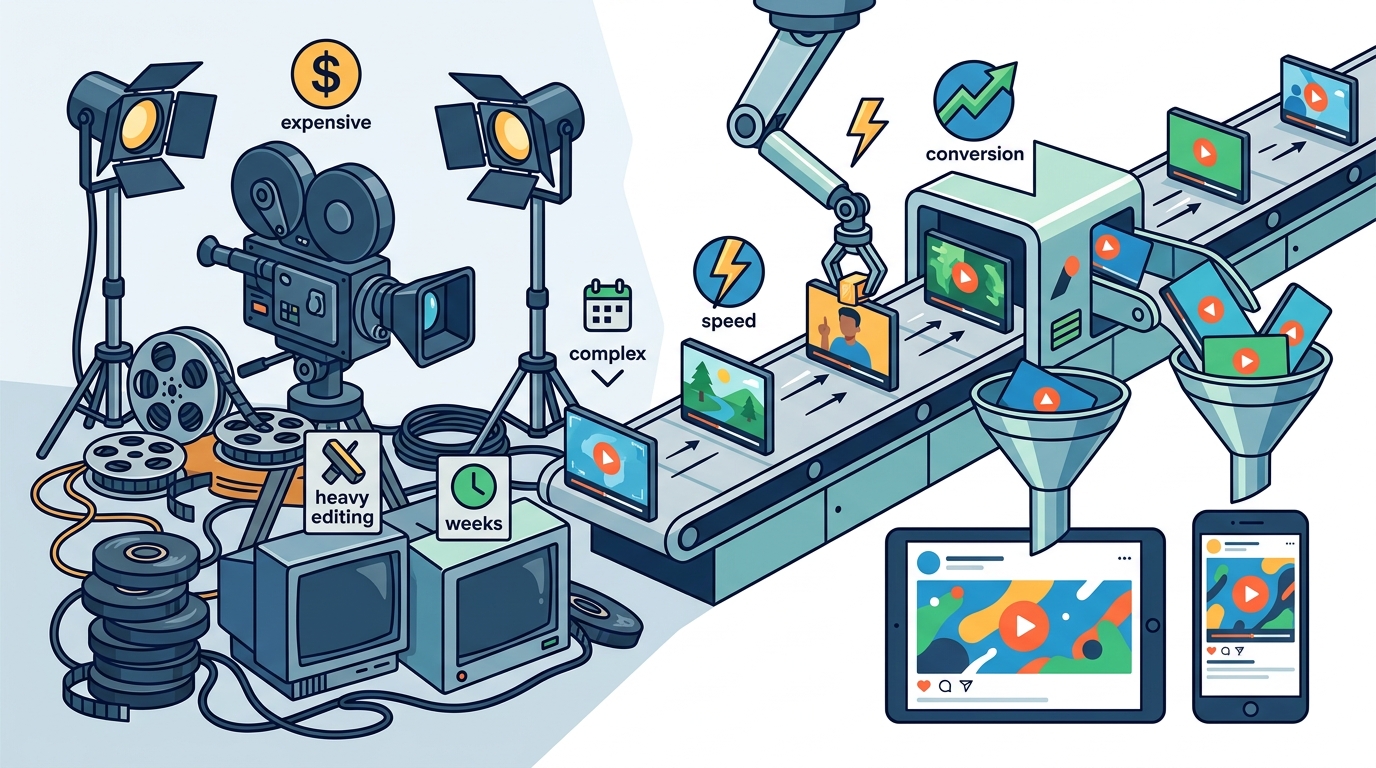
Video marketing is no longer optional. According to recent industry reports, video content drives 80% of all internet traffic and significantly boosts conversion rates compared to static text. However, producing high-quality videos traditionally requires expensive equipment, complex editing software, and weeks of production time. This bottleneck prevents many businesses from scaling their outreach. The solution lies in leveraging AI-powered video creation platforms that automate the heavy lifting. By using tools like Promo.com, marketers can generate professional-grade assets in minutes rather than days. This guide explains exactly how to streamline your workflow and maintain brand consistency at scale.
Understanding AI Video Automation
Traditional video production involves a linear, labor-intensive chain of events. You must script, film, edit, add voiceovers, and export. Each step introduces delays and potential errors. AI video automation disrupts this model by decoupling content creation from physical production. Instead of filming, you upload media or use stock libraries. The software handles the sequencing, transitions, and audio synchronization.
AI video generation is the process of using artificial intelligence algorithms to assemble video assets based on user inputs. These inputs can range from a simple text prompt to a detailed brand kit. The system selects appropriate clips, applies motion graphics, and renders the final file. This technology allows businesses to produce hundreds of variations of a single campaign asset. It ensures that your marketing efforts remain consistent across all channels without requiring a large creative team.
The efficiency gains are substantial. Marketers using automated tools report reducing production time by up to 90%. This speed enables rapid testing of ad creatives. You can launch multiple versions of an ad to see which performs best. Then, you double down on the winner. This agility is critical in today's fast-paced digital landscape where trends change weekly.
Choosing the Right Platform
Not all video creation tools are built equally. Some are designed for professional editors who need granular control. Others are built for marketers who need speed and simplicity. For quick campaign generation, you need a platform that prioritizes ease of use and template variety. Look for tools that offer industry-specific templates. These templates are pre-designed for common use cases like real estate, fitness, or e-commerce.
When evaluating options, consider the following criteria:
- Template Library: Does the platform offer fresh, trending templates? Stale designs hurt brand perception.
- Media Assets: Access to high-quality stock footage and music is essential for professional results.
- Export Quality: Ensure the tool supports HD and 4K exports for high-resolution displays.
- Collaboration Features: Can your team work together on projects? This is vital for agency workflows.
Platforms like Promo.com excel in these areas by providing a vast library of templates tailored for social media and advertising. They also integrate seamlessly with popular social networks, allowing for direct publishing. This reduces the friction between creation and distribution.
Step-by-Step Creation Process
Generating video content quickly requires a structured approach. Follow these steps to streamline your workflow and ensure consistent output quality.
1. Define Your Objective and Audience
Before opening any software, clarify the goal of the video. Is it to drive sales, increase brand awareness, or educate customers? Your objective dictates the tone, length, and call to action. For example, a Facebook Story ad needs to be vertical and under 15 seconds. A YouTube intro might be longer and more branded. Understanding your audience's preferences helps you choose the right format.
2. Select a Relevant Template
Start with a template that matches your objective. Most AI video platforms categorize templates by industry and use case. Browse the blog for inspiration on trending formats. Select a template that aligns with your brand colors and style. This ensures visual consistency without starting from scratch. Customizing a template is faster than building a design from zero.
3. Upload Your Media or Use Stock Assets
You can use your own photos and video clips, or leverage the platform's stock library. Stock assets are useful for B-roll or background visuals. If using your own media, ensure the resolution is high. Low-quality uploads will degrade the final output. Organize your assets before uploading to save time during the editing phase.
4. Customize Text and Audio
Add your headline, body text, and call to action. Keep text concise. Viewers often watch videos without sound initially, so the text must convey the core message. Choose a background track that matches the mood. Upbeat music works for promotions, while calm tones suit educational content. Many platforms offer royalty-free music libraries to avoid copyright issues.
5. Review and Export
Preview the video on different screen sizes. Check for alignment issues or text that is too small. Once satisfied, export the file. Choose the format required by your target platform. MP4 is the standard for most social networks. Ensure the file size is optimized for fast loading.
Optimizing for Social Platforms
Each social network has unique requirements for video content. Ignoring these can reduce your reach and engagement. Here is how to optimize your videos for key platforms.
Instagram and Facebook Stories
These formats require vertical video (9:16 aspect ratio). The content must be engaging within the first three seconds. Use bold text and bright colors to capture attention. Promo Academy offers tutorials on creating effective story ads that drive clicks.
YouTube
YouTube supports horizontal video (16:9) for standard videos and vertical for Shorts. For standard videos, focus on high production value and clear audio. For Shorts, keep the content under 60 seconds and use trending audio. YouTube intros are crucial for brand recognition. Create a consistent intro that plays at the start of your videos.
TikTok
TikTok favors authentic, raw content. While polished videos work, user-generated style content often performs better. Use trending sounds and hashtags. Keep the video length between 15 and 30 seconds for maximum retention.
LinkedIn audiences prefer professional, informative content. B2B videos should focus on value propositions and industry insights. Horizontal video is standard, but vertical is gaining traction. Ensure your messaging is clear and concise.
Scaling Your Content Strategy
Creating one video is easy. Creating hundreds is a challenge. Scaling requires automation and repetition. Use the same template structure for multiple campaigns. Change only the text and images. This method, known as dynamic creative optimization, allows you to test different messages quickly.
Another scaling strategy is repurposing content. Take a long-form video and cut it into shorter clips for social media. Use AI tools to automatically generate captions and subtitles. This expands your reach to viewers who watch without sound. It also improves accessibility.
Consistency is key. Develop a content calendar that aligns with your marketing goals. Use tools like the Social Media Calendar to plan your posts in advance. This ensures you never run out of content and can maintain a steady presence online.
Key Takeaways
- Video content drives 80% of internet traffic, making it essential for modern marketing.
- AI video automation reduces production time by up to 90% compared to traditional methods.
- Using pre-designed templates ensures brand consistency and speeds up the creation process.
- Optimizing aspect ratios for each platform (vertical for Stories, horizontal for YouTube) maximizes engagement.
- Dynamic creative optimization allows for rapid testing of multiple ad variations.
- Repurposing long-form content into short clips extends the lifespan of your marketing assets.
- Platforms like Promo.com provide the tools and templates needed for scalable video production.
Frequently Asked Questions
How long does it take to create a video with AI?
Creating a video with AI can take anywhere from 5 to 15 minutes, depending on the complexity of the template and the amount of customization required. This is significantly faster than traditional editing, which can take hours or days.
Do I need professional video equipment?
No. AI video platforms rely on stock footage and templates. You can use your own photos or smartphone videos, but professional cameras are not required. The software handles the quality enhancement and editing.
Can I use AI video tools for paid advertising?
Yes. Many AI video platforms offer templates specifically designed for Facebook, Instagram, and LinkedIn ads. These templates are optimized for ad specs and best practices to improve click-through rates.
Is the music in AI video tools royalty-free?
Most reputable platforms provide royalty-free music libraries. This means you can use the tracks in your commercial videos without paying additional licensing fees. Always check the platform's terms of service to confirm.
How do I ensure brand consistency across videos?
Use brand kits to save your logo, colors, and fonts. Apply these settings to all templates. This ensures that every video you create aligns with your brand identity, regardless of who creates it.
What is the best aspect ratio for social media videos?
It depends on the platform. Use 9:16 (vertical) for Instagram Stories, Facebook Stories, and TikTok. Use 16:9 (horizontal) for YouTube and LinkedIn. Use 1:1 (square) for Instagram feed posts if you prefer a balanced look.
Can I collaborate with my team on video projects?
Yes. Many platforms offer team collaboration features. You can invite team members to edit, comment, and approve videos. This streamlines the workflow and ensures everyone is on the same page.
Start Creating Today
Stop letting production delays hold back your marketing campaigns. The tools to create professional, high-impact videos are now accessible to everyone. By leveraging AI-powered platforms, you can generate content faster, test more ideas, and scale your reach. Visit Promo.com to start creating your first video today. Explore our blog for more tips and resources to master video marketing.